· Documentation · 5 min read
Scaling Terraform - A GitOps Prelude
My decade of scaling GitOps workflows with Terraform

Introduction
My journey with Infrastructure as Code (IaC) started with server configuration using Puppet in 2012. I used Vagrant to test modules, Packer to build AMIs, and a mix of CloudFormation and the AWS Python SDK to deploy infrastructure. This was a major step up from the artisanal operations of pet management—but it still meant tedious config management and effectively kept software engineers away from the dungeons of “the ops people.”I began developing an approach to eliminate manual configuration and reduce complexity. With the early release of Terraform in 2014, it became clear this tool could lower the barrier to entry, minimize the blast radius of changes, and enable a more dynamic way to build and manage infrastructure. I introduced the first iteration in a SysAdvent article in 2016.
Terraform has matured since then, and the core principles of this approach have only gotten stronger. Yet people still argue over deployment strategies—usually because they’re trying to sell you something. I am not.
Since then, I’ve implemented this approach across multiple organizations—large and small—with lasting success. In every case, teams were able to maintain and evolve it long after I was gone. That kind of staying power is rare in infrastructure work.
In this post, I’ll cover:
The HCL formatting throughout follows my Terraform style guide, shaped by lessons learned and feedback from real-world rollouts.
What Are We Solving?
Here is a list of benifits and problems we’re solving with this approach:
- Terraform version mismatches
- Misconfigured enviroments
- Overhead of Terraform setup (init, upgrading modules, backend configuration)
- Free: just be willing to run a pretty clean bash script
- Limit the amount of things you need to manage in order to ship
What is GitOps?
GitOps is a modern DevOps practice that uses Git as the single source of truth for managing infrastructure and application configurations. It brings the principles of version control, collaboration, compliance, and automation to infrastructure operations, making it easier to manage complex systems reliably and at scale.
I. Foundational Hierarchy
At the highest level, we maintain a dedicated GitHub repository to manage infrastructure. This is where Terraform runs and where we define our root modules—the entry points for applying changes.
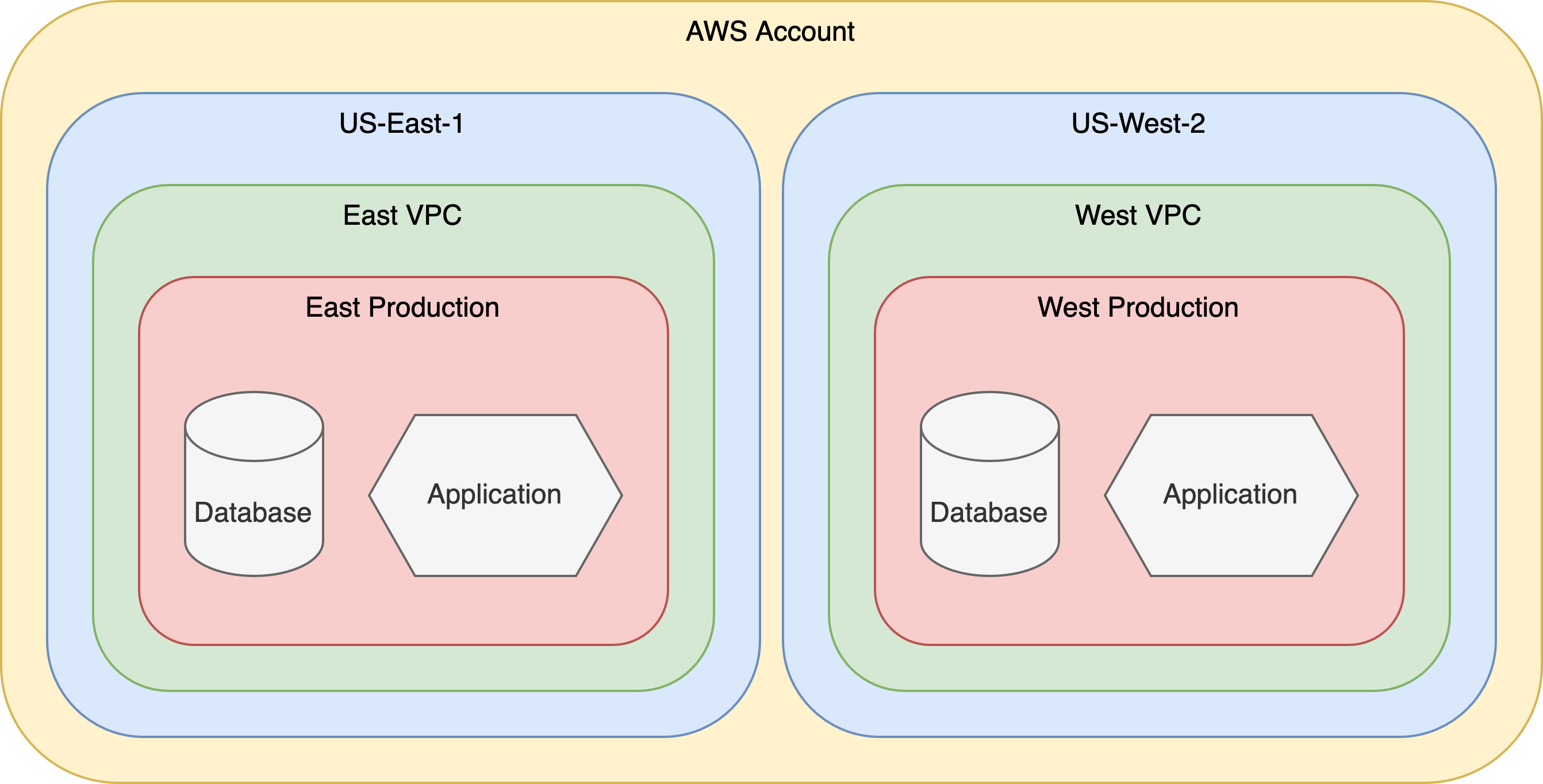
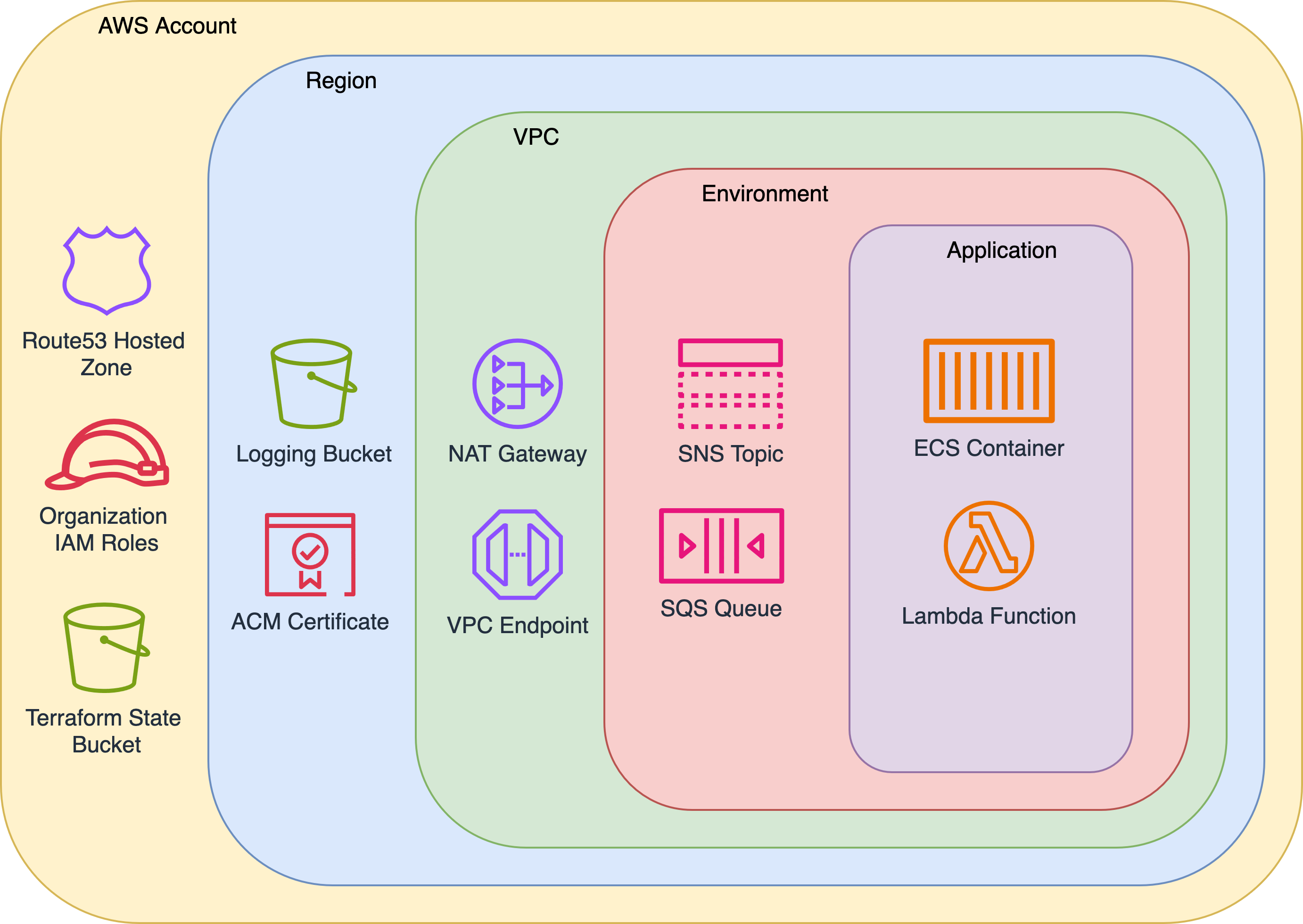
The directory structure mirrors the AWS resource hierarchy. Top-level folders manage account-wide resources, and each nested directory scopes resources further—by region, VPC, environment, and finally, service. Each directory contains a root module that calls the relevant, versioned child module, providing consistency, isolation, and traceability at every layer.
II. Root Modules
A core tenet of this approach is consistency. Every account follows the same layout, and each root module shares a standardized pattern—making it easier to onboard new team members, enforce standards, and scale infrastructure reliably.
Each root module consists of Terraform configuration files (backend.tf, provider.tf, main.tf, and versions.tf), variable definition file (variables.tf) and output values file (outputs.tf). The main.tf file is responsible for calling and configuring the relevant child module(s).
The final piece is terraform.sh—a Bash wrapper that handles several configuration steps and serves as the backbone of this approach. It’s shared across all root modules via a symlink to infrastructure/utilities/terraform.sh.
Terraform Wrapper
The consistent folder structure and module composition provide a few key guarantees. The terraform.sh wrapper builds on this by using the directory path to populate Terraform input variables—applying a convention-over-configuration approach.
The script accepts standard Terraform subcommands (apply, plan, destroy, import, etc.) and performs the following during root module setup:
- Populates input variables based on folder names in the path
- Creates a
provider.tffile and sets default tags - Creates a
backend.tffile and configures the remote state location - Creates a
versions.tffile with Terraform and AWS provider versions - Installs the specified version of Terraform using
tfenv - Sets and creates the
TF_PLUGIN_CACHE_DIR - Initializes the root module and upgrades child modules
Example Root Account Module
1.9.4# Generated by terraform.sh
terraform {
backend "s3" {
bucket = "curiqa-prod-terraform-state-use1"
key = "aws/terraform.tfstate"
profile = "curiqa-prod"
region = "us-east-1"
}
}module "account" {
source = "git@github.com:Curiqa/terraform-modules.git//account?ref=117dd812c"
aws_account = var.aws_account
domain_name = var.domain_name
}output "account" {
value = module.account
}# Generated by terraform.sh
provider "aws" {
profile = var.aws_account
region = var.aws_region
default_tags {
tags = {
aws_account = "curiqa-prod"
}
}
}#!/bin/bash
ACCOUNT_REGION="us-east-1"
ACCOUNT_REGION_SHORTNAME="use1"
help_message() {
echo -e "Usage: $0 [apply|destroy|plan|refresh|show|state|output]\n"
echo -e "The following arguments are supported:"
echo -e "\tapply \t Refresh the Terraform remote state, perform a \"terraform get -update\", and issue a \"terraform apply\""
echo -e "\tdestroy \t Refresh the Terraform remote state and destroy the Terraform stack"
echo -e "\timport \t Refresh the Terraform remote state and import existing resources"
echo -e "\tplan \t Refresh the Terraform remote state, perform a \"terraform get -update\", and issues a \"terraform plan\""
echo -e "\toutput \t Refresh the Terraform remote state and perform a \"terraform output\""
echo -e "\trefresh \t Refresh the Terraform remote state"
echo -e "\tshow \t Refresh and show the Terraform remote state"
echo -e "\tstate \t Refresh the Terraform remote state and perform a \"terraform state\""
exit 1
}
###############################
#### Terraform subcommands ####
###############################
apply() {
plan $@
echo -e "\n\n***** Running \"terraform apply\" *****"
if [ $# -gt 1 ]; then
shift
terraform apply "$@" -auto-approve=true
else
terraform apply -auto-approve=true
fi
}
destroy() {
shift
plan -destroy $@
echo -e "\n\n***** Running \"terraform destroy\" *****"
terraform destroy "$@"
}
import() {
refresh
echo -e "\n\n***** Running \"terraform import\" *****"
shift
terraform import $@
}
mv() {
refresh
echo $@
shift
echo -e "\n\n***** Running \"terraform state mv\" *****"
terraform state mv "$@"
}
output() {
refresh
shift
terraform output $@
}
plan() {
refresh
echo -e "\n\n***** Running \"terraform plan\" *****"
if [[ $1 == -destroy ]]; then
terraform plan -detailed-exitcode $@
elif [ $# -gt 1 ]; then
shift
terraform plan -detailed-exitcode $@
else
terraform plan -detailed-exitcode
fi
}
show() {
refresh
echo -e "\n\n***** Running \"terraform show\" *****"
terraform show
}
state() {
refresh
shift
echo -e "\n\n***** Running \"terraform state $@\" *****"
terraform state $@
}
#####################################
#### Terraform Root Module Setup ####
#####################################
refresh() {
# Start providers config to set default tags
/bin/cat > providers.tf <<EOL
provider "aws" {
profile = var.aws_account
region = var.aws_region
default_tags {
tags = {
EOL
# parse pwd thru "aws"
IFS="/" read -ra PARTS <<< "$(pwd)"
for i in "${!PARTS[@]}"; do
if [ "${PARTS[$i]}" == "aws" ]; then
START_POS=$i
fi
done
PARTS=("${PARTS[@]:${START_POS}}")
# set account-level variables
if [ "${#PARTS[@]}" -ge "2" ]; then
root=${PARTS[0]}
aws_account=${PARTS[1]}
key="${root}/terraform.tfstate"
export TF_VAR_root="$root"
export TF_VAR_aws_account="$aws_account"
echo " aws_account = \"$aws_account\"" >> providers.tf
fi
# set region-level variables
if [ "${#PARTS[@]}" -ge "3" ]; then
aws_region=${PARTS[2]}
key="${root}/${aws_region}/terraform.tfstate"
export TF_VAR_aws_region="$aws_region"
echo " aws_region = \"$aws_region\"" >> providers.tf
fi
# set vpc-level variables
if [ "${#PARTS[@]}" -ge "4" ]; then
vpc_name=${PARTS[3]}
key="${root}/${aws_region}/${vpc_name}/terraform.tfstate"
export TF_VAR_vpc_name="$vpc_name"
echo " vpc_name = \"$vpc_name\"" >> providers.tf
fi
# set enviroment-level variables
if [ "${#PARTS[@]}" -ge "5" ]; then
environment_name=${PARTS[4]}
key="${root}/${aws_region}/${vpc_name}/${environment_name}/terraform.tfstate"
export TF_VAR_environment_name="$environment_name"
echo " environment_name = \"$environment_name\"" >> providers.tf
echo " env = \"$environment_name\"" >> providers.tf
fi
# set service-level variables
if [ "${#PARTS[@]}" -ge "6" ]; then
service_name=${PARTS[5]}
key="${root}/${aws_region}/${vpc_name}/${environment_name}/${service_name}/terraform.tfstate"
export TF_VAR_service_name="$service_name"
echo " service_name = \"$service_name\"" >> providers.tf
echo " service = \"$service_name\"" >> providers.tf
fi
# Complete providers config
/bin/cat >> providers.tf <<EOL
}
}
}
EOL
# Set region for account level applies
[ ! -z "$aws_region" ] || TF_VAR_aws_region="${ACCOUNT_REGION}"
export TF_PLUGIN_CACHE_DIR="$HOME/.terraform.d/plugin-cache"
tf_init
}
tf_init() {
create_versions_config
create_backend_config
echo -e "\n\n***** Refreshing State and Upgrading Modules *****"
terraform init -get=true \
-upgrade \
-input=false #> /dev/null #> /dev/null 2>&1
[ $? -eq 0 ] || exit 1
}
create_versions_config() {
[ -f ".terraform-version" ] || { echo ".terraform-version is required, exiting" && exit 1; }
v=$(cat .terraform-version)
tfenv use $v > /dev/null 2>&1 || { tfenv install $v && tfenv use $v; }
/bin/cat > versions.tf <<EOL
terraform {
required_version = "${v}"
required_providers {
aws = {
version = "~> 5.0"
}
}
}
EOL
}
create_backend_config() {
local bucket="${aws_account}-terraform-state-$ACCOUNT_REGION_SHORTNAME"
/bin/cat > backend.tf <<EOL
terraform {
backend "s3" {
bucket = "${bucket}"
key = "${key}"
profile = "${aws_account}"
region = "${ACCOUNT_REGION}"
}
}
EOL
}
## Begin script ##
unset AWS_ACCESS_KEY_ID AWS_SESSION_TOKEN AWS_SECRET_ACCESS_KEY
if [ "$1" = "-h" ] || [ "$1" = "--help" ]; then
help_message
fi
[ -d $HOME/.terraform.d/plugin-cache ] || mkdir -p $HOME/.terraform.d/plugin-cache
ACTION="$1"
case $ACTION in
apply|destroy|import|plan|output|refresh|show|sso_login|state)
$ACTION $@
;;
****)
echo "That is not a valid choice."
help_message
;;
esacvariable "aws_account" {}
variable "aws_region" {}
variable "domain_name" {
default = "curiqa.com"
}# Generated by terraform.sh
terraform {
required_version = "1.0.9"
required_providers {
aws = {
version = "~> 5.0"
}
}
}Applying Root Account Module & Remote State
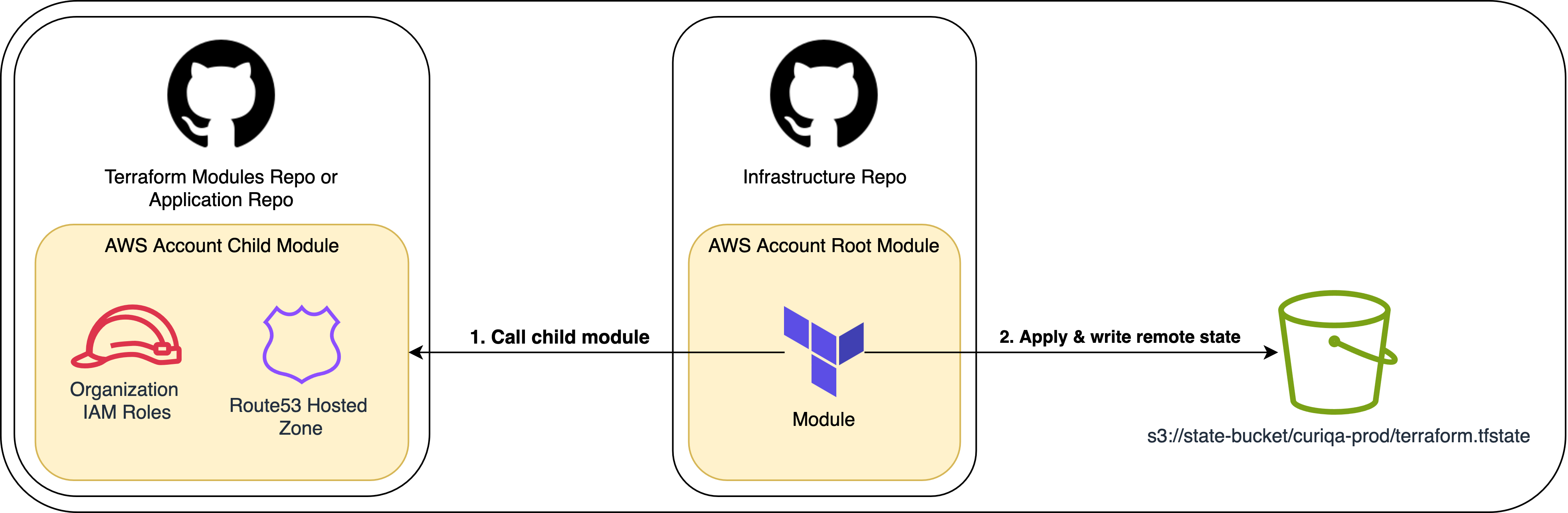
Terraform creates resources defined in child modules, and any output values declared within those modules are available only within the root module’s context. These outputs are not directly accessible via remote state unless they are explicitly exposed by the root module.
In this setup, the root module’s outputs.tf file exports the entire child module’s outputs as a single object. This approach lets us define output values once in the child module and makes them available to other modules through terraform_remote_state.
# Child module outputs.tf file
output "admin_iam_role_arn" {
value = aws_iam_role.admin_iam_role.arn
}
output "domain_name" {
value = var.domain_name
}
...# Root module outputs.tf file
output "account" {
  value = module.account
}This sets the stage for discussing child modules—and how dynamic variable naming based on folder structure becomes a powerful pattern for scaling and reuse.

III. Child Modules
The child modules contain configuration blocks used to create infrastructure objects. Let’s take a look at a very basic region module.
data.tf
outputs.tf
route53.tf
variables.tf
Building of the previous sections we have:
- An
infrastructurerepo containing anawsprovider directory with a resource hierarchy that mirrors the cloud architecture - Root modules that reference versioned child modules and store remote state in S3 using a consistent key structure
- A
terraform.shwrapper that automates configuration and bootstraps each root module based on directory context
Child Module Structure
# Create Wildcard Certificate
resource "aws_acm_certificate" "certificate" {
  domain_name       = data.terraform_remote_state.account.outputs.account.domain_name
  validation_method = "DNS"
  subject_alternative_names = [
    "${data.terraform_remote_state.account.outputs.account.domain_name}",
    "*.${data.terraform_remote_state.account.outputs.account.domain_name}"
  ]
}

# Create Certificate Validation
resource "aws_acm_certificate_validation" "certificate_validation" {
  certificate_arn         = aws_acm_certificate.certificate.arn
  validation_record_fqdns = [for record in aws_route53_record.certificate_validation_record : record.fqdn]
}
We deploy our
While root modules don’t directly reference those above them, the modules they call can access outputs from parent modules through remote state.