· Tutorials · 3 min read
Managing Similar Resources in Terraform
Reduce the noise in your modules.
One of the best parts of Terraform is the ability to integrate with other parts of your infrastructure. Creating lambda functions and API endpoints can be tedious though. Manging multiple configurations, even worse.
Imagine building this API with Lambda and API Gateway. We’re going to define each Endpoint with its own Lambda so we reduce the risk of impacting other endpoints if one is bad.
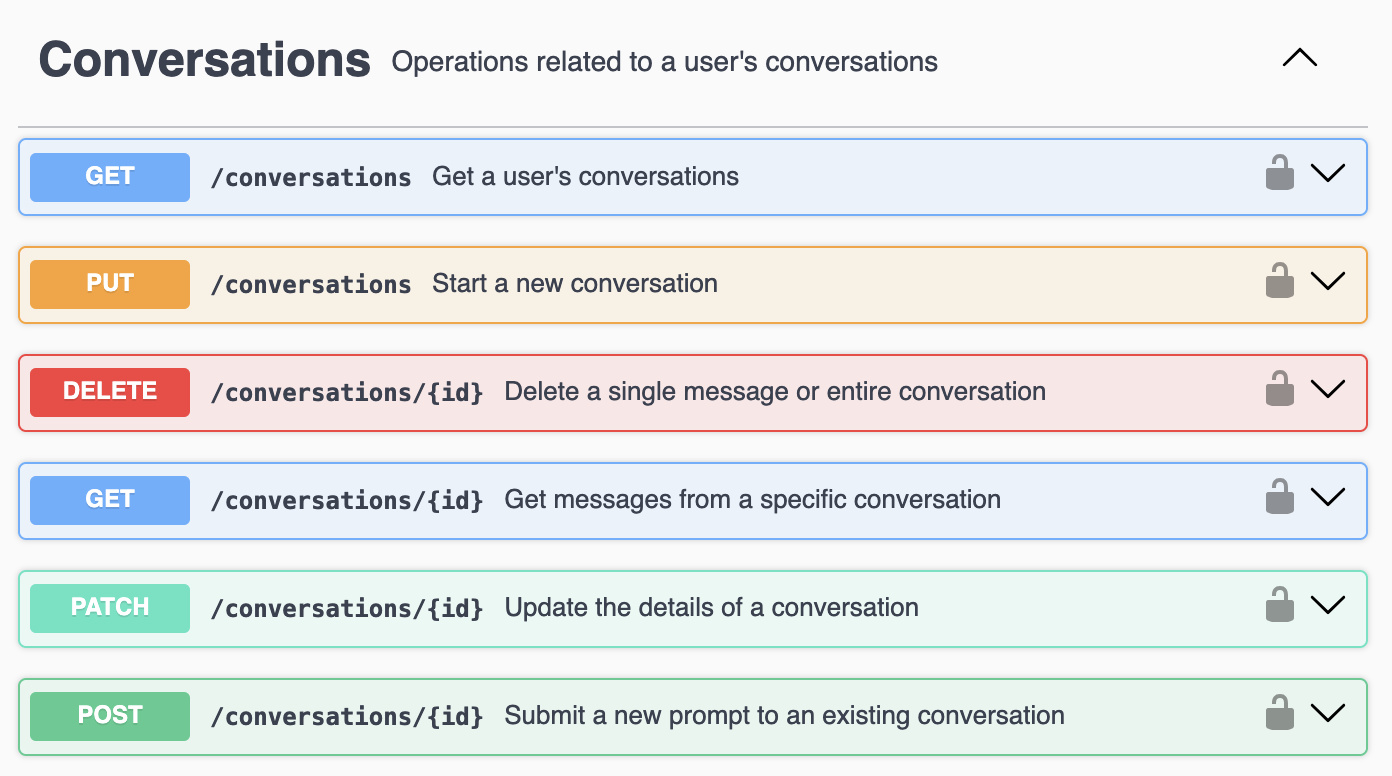
It also allows us to scale out lambdas independently based on the endpoints usage (run time and resoruces).
We’re going to use for_each meta-argument to loop over a map defined in a local variable called “api_lambda_functions.”
You generally don’t want to define each lambda individually and end up with something that looks like this:
resource "aws_lambda_function" "function" {
  for_each = local.api_lambda_functions

  architectures     = each.value["architectures"]
  description       = each.value["description"]
  function_name     = each.value["function_name"]
  handler           = each.value["handler"]
  memory_size       = each.value["memory_size"]
  publish           = each.value["publish"]
  runtime           = each.value["runtime"]
  role              = each.value["role"]
  s3_bucket         = each.value["s3_bucket"]
  s3_key            = each.value["s3_key"]
  s3_object_version = each.value["s3_object_version"]
  timeout           = each.value["timeout"]

  tracing_config {
    mode = each.value["tracing_mode"]
  }
}

locals {
  api_lambda_functions = {
    ### Conversations Endpoints ###
    delete_conversation = {
      architectures     = "arm64"
      description       = "Delete a user's conversation and its messages."
      function_name     = "${var.environment_name}-delete-conversation"
      handler           = "main.${each.key}"
      memory_size       = 128
      publish           = "true"
      role              = aws_iam_role.iam_role["lambda"].arn
      route_key         = "DELETE /conversations/{id}"
      runtime           = "python3.11"
      s3_bucket         = var.lambda_function_repository_bucket
      s3_key            = data.aws_s3_object.lambda_s3_object["api"].key
      s3_object_version = data.aws_s3_object.lambda_s3_object["api"].version_id
      timeout           = 900
    }
  }
}locals {
api_lambda_functions = {
### Conversations Endpoints ###
delete_conversation = {
description = "Delete a user's conversation and its messages."
route_key = "DELETE /conversations/{id}"
}
get_conversations = {
description = "Get a user's conversations IDs and conversation titles."
route_key = "GET /conversations"
}
get_conversations_id = {
description = "Get a user's messages from a specific conversation."
route_key = "GET /conversations/{id}"
}
patch_conversation = {
description = "Update a conversation."
route_key = "PATCH /conversations/{id}"
}
post_conversations_id = {
description = "Continues a conversation."
route_key = "POST /conversations/{id}"
memory_size = "512"
}
put_conversations = {
description = "Creates a new conversation."
route_key = "PUT /conversations"
memory_size = "512"
}
}
}You might notice that not all objects in the map have the memory_size key. This is where the neat stuff happens. Using the try function, we can set default values for keys. This allows us to significantly trim the maps in our local variables.
resource "aws_lambda_function" "function" {
  for_each = local.api_lambda_functions

  architectures     = try(each.value["architectures"], ["arm64"])
  description       = each.value["description"]
  function_name     = "${var.environment_name}-${replace(each.key, "_", "-")}"
  handler           = "main.${each.key}"
  memory_size       = try(each.value["memory_size"], 128)
  publish           = try(each.value["publish"], "true")
  runtime           = try(each.value["runtime"], "python3.11")
  role              = try(each.value["role"], aws_iam_role.iam_role["lambda"].arn)
  s3_bucket         = var.lambda_function_repository_bucket
  s3_key            = data.aws_s3_object.lambda_s3_object["${try(each.value["tier"], "api")}"].key
  s3_object_version = data.aws_s3_object.lambda_s3_object["${try(each.value["tier"], "api")}"].version_id
  timeout           = try(each.value["timeout"], 900)

  tracing_config {
    mode = "Active"
  }